Upwork Fees Explained: What You Actually Pay Per Project
Upwork's 0–15% service fee, $0.15 Connects, $19.99 Freelancer Plus and $0.99 withdrawal fee explained, with what you keep from a $1,000 project.
In this guide
- 1. What is Upwork’s freelancer service fee?
- 2. How much does Upwork take from $100, $500 or $1,000?
- 3. Is the fee the same for hourly and fixed-price contracts?
- 4. Do you have to pay to apply for jobs?
- 5. Is Upwork Freelancer Plus worth it?
- 6. Are there withdrawal fees?
- 7. What other costs should you budget for?
- 8. Full example: what’s left from a $1,000 project?
- 9. How to price your services to cover Upwork fees
- 10. How to reduce the impact of Upwork fees
- Frequently asked questions
- Final thoughts
If you’re planning to freelance on Upwork, there’s one thing to understand before you accept your first project: what the client pays isn’t what you receive.
Upwork charges freelancers a service fee, and you may also spend money on Connects to apply for jobs, on withdrawing your earnings and on optional membership features. These costs matter most when you’re starting out with small budgets.
The good news is that Upwork shows you the service fee for each contract before you commit. Once you understand how each charge works, you can price your services properly and avoid nasty surprises. This guide covers every main fee, what you’d pay on different project sizes and how much you really keep.
1. What is Upwork’s freelancer service fee?
The freelancer service fee is the share Upwork deducts from your earnings for providing its marketplace.
According to Upwork’s Help Center, the fee currently ranges from 0% to 15% per contract. The exact percentage depends on the contract, and you can see it before you submit a proposal or accept an offer. Once the contract starts, that fee is locked in for the contract.
So don’t assume every project carries the same fee. If a client offers $500 for a website and your contract fee is 10%, Upwork deducts $50 and you keep $450 before any other costs:
| Item | Amount |
|---|---|
| Project value | $500 |
| Upwork service fee | 10% |
| Fee deducted | $50 |
| Earnings remaining | $450 |
2. How much does Upwork take from $100, $500 or $1,000?
The quickest way to understand the fee is to see it on different project sizes. These are illustrations at different fee levels, not a claim that any contract will have a particular fee.
| Project value | Fee at 5% | Fee at 10% | Fee at 15% |
|---|---|---|---|
| $100 | $5 | $10 | $15 |
| $500 | $25 | $50 | $75 |
| $1,000 | $50 | $100 | $150 |
| $2,000 | $100 | $200 | $300 |
On a $1,000 project, a 10% fee leaves you $900 and a 15% fee leaves $850. A few percentage points make a real difference on larger contracts or long-term clients, so always check the fee before committing.
3. Is the fee the same for hourly and fixed-price contracts?
The service fee applies to both hourly and fixed-price contracts. It also applies to Project Catalog projects and bonuses, with some exceptions listed by Upwork. What changes is how you earn, not whether there’s a fee.
Hourly contracts
You set an hourly rate and bill the client for hours worked under the contract. At $20 an hour for 25 hours in a week:
| Calculation | Amount |
|---|---|
| Hourly rate | $20 |
| Hours billed | 25 |
| Total earnings | $500 |
| Service fee (10%) | −$50 |
| Earnings after fee | $450 |
Remember that time spent finding clients, writing proposals or updating your portfolio isn’t billable. Factor that in when deciding whether your rate is high enough.
Fixed-price contracts
You and the client agree on a price for a project or milestone. For an $800 website with a 10% fee:
| Calculation | Amount |
|---|---|
| Agreed project price | $800 |
| Service fee (10%) | −$80 |
| Earnings after fee | $720 |
Now think about time. If the site takes 40 hours, you’re earning $18 an hour after the fee. If it takes 80 hours, that drops to $9 an hour. Underestimate the work, and a project that looked lucrative can turn out to be poor value. See Hourly vs. Fixed-Price Projects for how to estimate fixed prices safely.
4. Do you have to pay to apply for jobs?
Yes. Most job applications on Upwork require Connects, Upwork’s virtual tokens for submitting proposals. The number needed varies by job.
Freelancers on the free Basic plan receive 10 Connects a month. Additional Connects cost $0.15 each, with a minimum purchase of 10. You may sometimes receive free Connects or promotional rewards, but don’t expect proposals to be free.
If you apply to 20 jobs at 10 Connects each, you use 200 Connects. Buying them would cost $30:
| Item | Amount |
|---|---|
| Number of proposals | 20 |
| Connects per proposal (assumed) | 10 |
| Total Connects used | 200 |
| Cost per Connect | $0.15 |
| Total cost if all Connects are purchased | $30 |
Spending Connects doesn’t guarantee a contract. You can spend money on many applications without getting an offer, so focus on jobs that genuinely match your skills rather than applying to everything you see. Our guide to How to Write a Freelance Proposal That Gets Replies will help you win more of the jobs you do apply for.
5. Is Upwork Freelancer Plus worth it?
Freelancer Plus is Upwork’s paid membership. It currently costs $19.99 a month and includes 100 Connects a month (versus 10 on the Basic plan), plus proposal insights and other tools for finding work.
Buying 100 Connects separately would cost $15, so Freelancer Plus effectively charges about $5 a month for the extra features. That can be worth it if you send many proposals every month. But the membership doesn’t guarantee more clients or higher income. If you’re a beginner on a tight budget, start on the free plan, learn how the platform works and upgrade only once you know you’ll use the features.
6. Are there withdrawal fees?
Yes, depending on how you withdraw. Upwork’s Direct to Local Bank method costs $0.99 per withdrawal, plus any fee your own bank charges. For Pakistan, Upwork lists a minimum of $5 and a maximum of $8,999 per Direct to Local Bank withdrawal, and transfers normally arrive within four business days.
Other methods have different costs, and your bank or payment provider may charge extra. If you withdraw $500 by Direct to Local Bank, you’d have $499.01 before currency conversion and any bank charges. The exchange rate often matters more than the $0.99 fee, which we explain in How Currency Conversion Eats Your Earnings.
For freelancers in Pakistan, compare the options in your own account: Direct to Local Bank, Payoneer and others. See How to Receive Freelance Payments in Pakistan for a full comparison.
7. What other costs should you budget for?
The service fee isn’t the only thing reducing your profit. Depending on your work, you may also need to budget for:
- Connects: for proposals and optional promoted bids.
- Membership: optional subscriptions such as Freelancer Plus.
- Payments and currency conversion: charges from payment providers or banks.
- Software and tools: design software, hosting, AI tools, stock assets and other subscriptions.
- Internet and equipment: your connection, computer and maintenance.
- Taxes: whatever you owe under the rules where you live.
Not every freelancer has all of these. A writer using free tools has a very different cost structure from a web developer paying for hosting, premium plugins and testing tools. What matters is calculating profit after your costs, not just looking at the contract price.
8. Full example: what’s left from a $1,000 project?
Let’s put it together. You finish a $1,000 project with a 10% service fee. You spent about $15 on Connects to find the job, and you pay $0.99 to withdraw.
| Item | Amount |
|---|---|
| Project earnings | $1,000.00 |
| Upwork service fee (10%) | −$100.00 |
| Connects cost spent finding this project | −$15.00 |
| Withdrawal fee (Direct to Local Bank) | −$0.99 |
| Remaining | $884.01 |
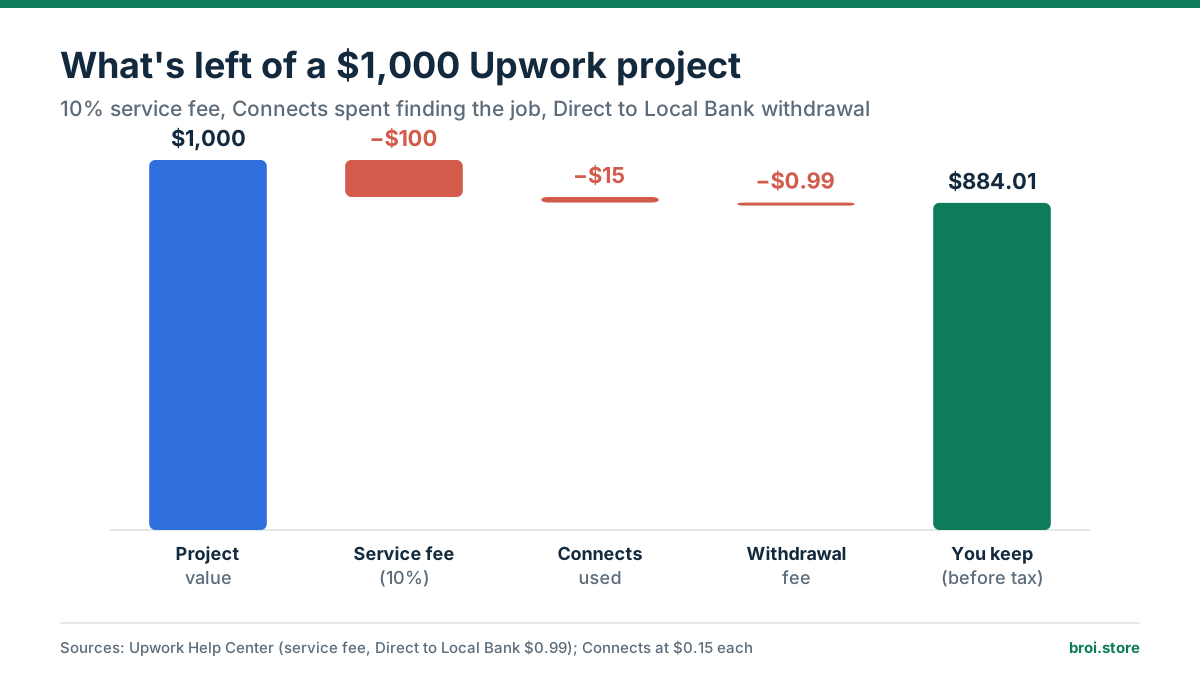
Out of the $884.01, you still pay taxes, software, internet and other business costs. The $15 of Connects isn’t deducted from the contract payment. It’s money you already spent, allocated to this project, and proposals that didn’t win also cost you money.
That’s the realistic way to think about freelance income: a $1,000 project is not $1,000 of profit.
9. How to price your services to cover Upwork fees
A common mistake is to set your rate as the amount you want to keep. If you want $30 an hour after a 10% fee and you charge $30, you’ll actually keep $27.
To find the rate you need to charge, divide your target by the share you keep:
Required rate = Target earnings ÷ (1 − fee percentage)
$30 ÷ (1 − 0.10) = $33.33 per hour
| You want to keep | Fee | Rate to charge |
|---|---|---|
| $20/hr | 10% | $22.22 |
| $30/hr | 10% | $33.33 |
| $40/hr | 10% | $44.44 |
| $50/hr | 15% | $58.82 |
These figures only account for the service fee, not Connects, subscriptions, taxes, withdrawals or other costs. The Freelance Take-Home Pay Calculator has a reverse mode that calculates the price you need to charge on Upwork, Fiverr or Freelancer.com to keep a target amount.
10. How to reduce the impact of Upwork fees
You can’t avoid platform and business costs entirely, but you can manage them:
- Check the service fee before accepting. Know the exact percentage and calculate your expected profit before committing.
- Apply selectively. Spend Connects on jobs that match your skills and portfolio. One strong proposal is worth more than ten generic ones.
- Price fixed-price work carefully. Account for revisions, communication and technical surprises before agreeing a price.
- Track your real costs. Record Connects purchases, subscriptions, withdrawal fees and other costs so you know which projects actually pay.
- Review your rates as you grow. Your rates should reflect the value you deliver and the cost of running your business.
- Compare withdrawal methods. Check current fees and exchange rates instead of relying on old advice.
The goal isn’t simply to pay the lowest possible fees. It’s to make sure every project earns enough to justify the time and money you put in.
Frequently asked questions
Does Upwork take 10% of every project?
No. Upwork’s freelancer service fee ranges from 0% to 15% per contract. The exact fee is shown before you submit a proposal or accept an offer, and it’s locked in once the contract starts.
If I earn $100 on Upwork, how much do I keep?
It depends on your contract’s fee: about $90 at 10%, $85 at 15% or $95 at 5%, before Connects, withdrawal fees, currency conversion and taxes.
Are fees different for hourly and fixed-price projects?
The service fee applies to both. The exact percentage depends on the contract, not on whether you’re paid by the hour or by the project.
Do I have to pay to apply for every job?
Most proposals require Connects, but some situations, such as responding to a client’s invitation or receiving a direct offer, may not. The number of Connects varies by job.
Can I avoid Upwork fees by asking the client to pay me directly?
Not freely. Upwork has rules about moving clients you met on the platform off it, including conversion fees and restrictions. Check Upwork’s Terms of Service before discussing payment outside the platform; breaking these rules can get your account suspended.
When do I get my money after finishing a project?
According to Upwork’s standard guidance, hourly earnings usually become available about 10 days after the end of the weekly billing period, and fixed-price payments become available about 5 days after the client approves a milestone. Other conditions can apply, so check your contract and account.
Are Upwork fees tax-deductible?
That depends on the tax rules that apply to you. Keep records of platform fees and business costs, and ask a qualified tax professional if you’re unsure how to report them.
Final thoughts
Upwork can be a great way to find clients and build a freelance business, but understanding its costs is part of running that business. The service fee is only one piece. Connects, optional subscriptions, withdrawal fees, software, taxes and unpaid time all affect what you keep.
Before you accept a project, check the fee, estimate your costs and calculate your expected profit. Choosing projects that pay you fairly for your time, rather than just winning more projects, is what builds a sustainable freelance career.
Sources
Run your own numbers
Platform fee, withdrawal, exchange rate and tax in one place, from the client's dollars to the rupees in your bank.
Open the Freelance Take-Home Pay Calculator